Capturing the aurora borealis is part science, part patience, and part magic. Use this guide to give yourself the best chance of returning home with truly stunning images.
🎒 1. Preparation Before You Go
Check the Forecasts
Aurora activity (Kp Index): Look for Kp 3+ for mid-latitudes; Kp 2+ is often sufficient in the Arctic.
Cloud cover: Clear or mostly clear skies are essential.
Moon phase: New moon or low moonlight reduces sky brightness.
Don’t hold the phone – movement will ruin the shot.
Wipe the lens (phone lenses fog easily).
Avoid digital zoom; move closer instead.
Test different shutter lengths until stars remain sharp.
🌍 TOP TEN LOCATIONS TO PHOTOGRAPH THE NORTHERN LIGHTS These locations offer reliable aurora activity, dark skies, and dramatic landscapes.
1. Tromsø, Norway High aurora frequency, accessible city, incredible fjords. 2. Abisko, Sweden Famous “blue hole” microclimate keeps skies clearer than surrounding regions. 3. Fairbanks, Alaska, USA Strong aurora zone, easy access, long season. 4. Yellowknife, Canada Flat horizons create uncluttered sky views—excellent for wide-angle shots. 5. Reykjavik Region & Þingvellir, Iceland Volcanic landscapes and easy access to dark skies. 6. Finnish Lapland (Rovaniemi, Saariselkä) Snow-covered forests make perfect foregrounds. 7. Svalbard, Norway Auroras even in daylight during polar night. 8. Kangerlussuaq, Greenland Minimal light pollution and frequent clear skies. 9. Murmansk & Kola Peninsula, Russia High latitude with unique Arctic landscapes. 10. Scottish Highlands & Isle of Skye, UK Best low-latitude aurora spot in Europe during strong solar storms.
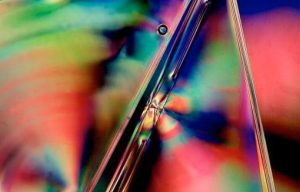
Cross-polarisation (or “cross-pol”) is a photographic technique where two polarising filters – one on the light source and one on the camera – are set at 90° to each other. When aligned correctly, the filters eliminate specular reflections and can reveal birefringence patterns in certain materials.
This guide walks you through exactly how to do it, using both studio and DIY setups.
1. Understanding the Core Concept
Light waves vibrate in all directions. A polarising filter only lets waves through that vibrate in one direction.
Polariser A (on the light): Makes the light “uniform,” allowing only one vibration direction.
Polariser B (on the lens): Blocks that direction and only passes waves vibrating 90° to it.
When the two filters are crossed, reflections vanish—but internal stress patterns inside transparent plastics glow with vivid colours.
Think of it as cancelling the surface glare so you can see the hidden interior world.
2. What You Need
You don’t need a fancy studio. Here are options for every budget:
Essential Equipment
A camera (phone, mirrorless, or DSLR)
A polarising filter for the lens
Circular polariser (CPL) for most photography
A polarising sheet for your light source
Linear polarising film is inexpensive and sold in A4 sheets
Optional but helpful
Two or more small LED panels (or even tablet screens)
Diffuser (white fabric or tracing paper)
Tripod (recommended)
Black background
3. Setting Up the Cross-Pol Lighting
Step A: Polarise your light
Place the polarising sheet in front of your light source.
If your light produces hotspots, add a diffuser behind the polarising film.
Make sure the polarising film covers the light completely – any uncovered portion will leak unfiltered light into your shot.
DIY tip:
A tablet or phone screen already emits polarised light – great for photographing small plastics like cutlery or toys.
4. Prepare Your Camera
Attach the CPL to your camera or phone adapter.
Point the camera at the polarised light.
Rotate the CPL slowly.
You’ll notice the light visibly darkening when the two polarisers reach a 90° relationship.
This is your cross-polarisation achieved.
5. Shooting Techniques
A. For Stress-Pattern Photography
Used with clear or translucent plastics.
Place the plastic object between the light and the camera.
Cross the polarisers (maximum black).
Increase exposure slightly to compensate for light loss.
Fine-tune the angle of the object – some stress patterns appear only at certain orientations.
Use a black or very dark background to intensify colours.
Common objects that reveal stunning patterns:
Sunglasses
Water bottles
Tape dispensers
Plastic spoons
Acrylic sheets
B. For Reflection-Elimination Photography
Used for glossy surfaces, jewellery, metal, and liquids.
Position your subject so the polarised light hits it at ~45°.
Rotate the CPL until reflections disappear.
Adjust your lighting angle if you see “patches” of unpolarised reflections.
This is extremely useful for product photography.
6. Exposure and Camera Settings
Cross-pol setups reduce the amount of light reaching the sensor. To compensate:
Increase ISO moderately (200–800)
Use longer shutter speeds (especially with tripod)
Open your aperture (f/2.8–f/5.6 works well)
Avoid raising ISO too high, as cross-pol images often contain smooth gradients where noise becomes visible.
7. Compositional Tips
Use backlighting for the strongest birefringence effects.
Rotate the subject slowly – stress colours shift dramatically.
Try using two polarised lights for symmetrical objects.
For artistic images, place multiple plastic objects overlapping to create abstract colour fields.
8. Troubleshooting
Problem: Colours look flat or dull
The polarisers may not be perfectly crossed – rotate the CPL again.
Your light source might not be fully covered by polarising film.
Problem: Still seeing reflections
Some reflections can bounce off walls and bypass the film – darken your shooting environment.
Check if any secondary light source is unpolarised.
Problem: Image too dark
Add more light intensity.
Widen your aperture.
Use longer exposure.
Problem: Colour bands too chaotic
Stress in objects varies naturally; try a different piece of plastic or rotate the one you’re using.
9. Creative Experiments
Try these once you’ve mastered the basics:
Cross-Polarised Portraits
This requires larger sheets of polarising film but removes skin shine and gives a matte, painterly look.
Cross-Pol Liquid Photography
Put clear liquids in glass containers – some oils and gels show subtle interference colours.
Scientific Documentation
This technique is used in archaeology and materials analysis to detect manufacturing stress patterns.
10. Final Tips for Better Results
Keep the scene as simple as possible – controlled light is everything.
Always clean your polarisers; smudges will show.
Work slowly: tiny adjustments create dramatic changes.
Embrace the unpredictability – cross-pol is part science, part magic.
You can buy your polarising filter from Photography Attic here: Polarising filters
The cross polarising techniques is a simple one to create. Just place a polarising filter in front of the lens and photograph a stiff plastic object in front of an LCD computer screen. Â To illustrate the tip I attached a Hoyarex Linear Polarising filter* to the front of a digital camera. Â
I then positioned a plastic cereal container in front of my computer monitor (make sure the background is neutral grey and not a screen saver ) and mounted the camera on a tripod. You can hand hold if there’s enough light to get a camera shake free photo.
When you rotate the polariser you will see a rainbow of colour with the background colour of the monitor.
As you rotate the colours will become stronger and the background will go black.
I repeated the technique using a plastic wine glass
* Any polarising filter can be used – linear or circular . We have a selection for sale here in both screw in and system filters. Polarising filters for sale. The system filters are more practical as you can use one filter with a variety of lenses with different filter threads. Just get the filter, a holder, and a range of adaptor rings for the holder to attach to different lenses.
Large format photographers using cameras with bellows have always had the luxury of being able to adjust the lens and/or sensor plane so they are not parallel. This technique is performed to alter the plane of focus. While a conventionally parallel set-up provides front to back sharpness from a focus point parallel to the sensor, the adjusted lens, swung or tilted, places the focus plane at a different angle. This is a very useful technique for landscape photography, allowing sharp focus from close range to infinity, even at wide open apertures. But it’s also incredibly useful for macro photography. With this in mind Photography Attic has taken a set of BPM camera bellows and modified them to create a versatile set of custom bellows with tilt, swing and also shift options.
The bellows lens and camera platforms are individually mounted on a pair of small ball & socket heads which can be attached to a straight bracket like the one you would use with a flash gun. You can then slide the ball and socket along the flash bracket to extend the bellows increase magnification. And then tilt the front or rear panel to create the new plane of focus.
Here’s an example of the tilted bellows in action. A small 25mm pocket watch has been photographed at an angle. Rather than head on and parallel to the camera lens. The lens was then tilted on the camera bellows set up and as a result the widest aperture of f/2.8 can be used with full front to back sharpness. As a comparison a second shot was taken with the lens set conventionally parallel to the film plane. Notice how the sharpness falls off to the rear.
Another option is to use the swing feature. Here the lens is angled in a clockwise or anti clockwise direction to provide sharer front to back focus on an upright subject.
You can also adjust to provide a combination of both tilt and swing when the subject is not horizontal or vertical.
This process is technically known as the Scheimpflug Principle. If you would like to lean more check out the wikipedia page here: Scheimpflug Principle
You can buy a set of modified bellows with tilt shift here:Custom Tilt Shift Bellows You will also need to buy a bracket to mount them on.
An amazing selection of snowflake macro photos and a article showing how to photograph snowflakes can be found on Alexey Kljatov’s ChaoticMind blog
If you have an SLR you can reverse your lens on the body using a reverse adaptor, or reverse a lens on a lens using a coupling ring (which has filter threads on both sides), or use extension tubes, close up lenses, macro lens or bellows. We have all these available on PhotographyAttic. If you cant find what you want contact us with specific requests
There’s an interesting series of videos appeared that were produced by Lee Filters with conversation between the revered landscape photographers, Joe Cornish and David Noton. Epsiode 2 sees them discussing the changes digital photography has made in capturing the moment, and why they still use graduated filters. It’s not like the usual manufacturer produced media as there’s no mention of Lee filters, and well worth a view.
Here’s a list of current used graduated filters for sale on PhotographyAttic:
In the last article we showed you how to make a custom slide duplicator for 35mm negatives and transparencies. And the first problem you will encounter when you start scanning your colour negatives is how to convert the result to a positive digital file.
When you use a proper film scanner it has built in settings that convert the negative to positive automatically, but the digital files from a slide duplicator look just like the original –Â negative image with an orange colour.
You may think it’s simply a case of pressing the invert button in your image editing software. That does make the photo look positive, but the orange inverts to a blue colour and that needs fixing.
Here’s how I process photos in Lightroom. You can do similar with most image editing programs.
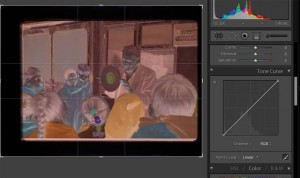
Below is the imported negative in Lightroom. Scroll down to the tone curve. Notice the line in the graph goes from bottom left to top right.
Â
Click on the bottom left corner and drag to top left, then click top right and drag to bottom right. This inverts the image – notice the blue cast.
Â
Using the WB dropper click on a neutral part of the image to adjust the white balance. I chose the black hair of the boy facing us. This makes the colours more natural. Now adjust the tone sliders to beef up contrast darken shadows and brighten highlights.
Â
The result is a fairly good conversion of your digital negative
If you’ve moved over to digital from film, chances are you will have a collection of film based photographs – either negatives or transparencies. If you don’t have a film scanner you can use your digital camera to digitise these old films.
I decided to do that using my Olympus OM-D. The problem I had was that the usual slide copier, such as the Aico Zoom Slide Duplicator or similar products from the likes of Jessop, Ohnar and Kenlock, is that they were designed for full frame cameras. So when the copier is mounted onto an OM-D (using a T2 mount and Adaptor from Micro 4/3 to T2 camera fitting) the image is cropped and you can only copy the centre (or edge if you adjust the frame position). You cannot copy the full frame.
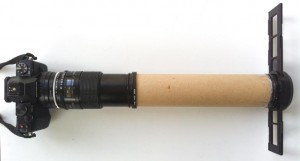
An alternative is to make your own copier. I dug out the Tamron 90mm f/2.5 macro with Pentax K Adaptall 2 attached, and mounted it on the Olympus body using a micro 4/3 to Pentax Adaptor.
Any macro lens with 1:1 capability will be suitable. Attach the macro lens, turn the camera on and move the slide away from the lens until it comes into focus on the camera’s LCD. This give you a rough indication of position needed for the slide/negative.
Cut a piece of tubing (postal tubes are perfect) to the necessary length. Now find a way of attaching the tube to the lens. I used a combination of stepping rings from the 55mm of the Tamron lens up to 58mm which was the external size of the tube. The tube squeezed into the inside of the ring and locked in place. If this hadn’t worked I would have super -glued a 55mm Cokin series A adaptor to the end.
You can now position the slide negative at the other end of the tube. A budget option is to use Blu Tack to hold the slide frame on the front. You could mount negatives in a frame too. As I have a lot to copy I decided to take off the carrier part of the Aico Zoom Slide Duplicator and mount that on the front of the tube. This ensured a faster throughput of film.
The carrier has three small screws holding it in place on the duplicator. These can be loosened so the whole front section slips off. Don’t unscrew fully as the screws are tiny and fiddly to get back in.
With the custom duplicator assembled it’s time to get to work copying. You can use a household lamp as backlight illumination, or a flashgun, or sunlight. You need to diffuse the light so it’s even across the film surface. The slide duplicator carrier has a diffusing plate built in. If you’re just mounting the slide on the front of the tube put a sheet of white cloth, or several layers of tracing paper in between the film and light source.
Use the camera’s zoom focus magnifier if it has one to focus accurately, making sure the film is centered in the frame and not cropped at any edge. Adjust exposure using the LCD as a gauge. Do a few test shots to check focus, framing an exposure before rattling through your library.
To be successful with bird photography you either need a very long lens or a shorter lens with a remote control (or hide) so you can position yourself far enough away to avoid frightening the creature.
The long lens approach needs to be around 500mm allowing you to magnify the bird so it appears substantially more than a spec on the photo.
The shorter lens approach (300mm or less) and you probably need to hide (in a hide), or use a remote control. This is the approach I took for this shot of a blue tit preparing to nest in a box in the garden. I’d watched the bird’s activity for a few hours and noticed it landed on a particular branch of the nearby tree. So I mounted the camera (an Olympus OM-D EM1) on a tripod and focused on that particular branch. It was about a meter away from the branch and using the 40-150mm gave me a reasonable crop.
The focusing was set to manual so nothing could cause it to shift out of focus and the exposure was also set to manual adjusting to ensure that highlights on the bird wouldn’t be blown out.
I could then take the transmitter and sit out of sight, triggering the camera when the bird landed on the branch. To make things easier I used a pair of 8×21 binoculars. With these I could look at the bird and fire when it was in the right position, and then look at the camera LCD as it flicked up the preview of the shot just taken.
To get a cleaner background you should ensure that any background bush is further away from the landing position, also use a large aperture to reduce depth-of-field.
If you don’t have a modern camera with an electronic socket for a remote release you can buy an air release with a bulb to trigger the camera via the cable release socket.
The best camera to use to photograph the moon is a Single Lens Reflex (SLR) camera. With this type of camera you usually have the most manual control, allowing you to fine tune focus and exposure to ensure a sharp and bright photo.
The moon photographed with an SLR and telephoto lens
An SLR usually has an interchangeable lens so you can attach a long lens (telephoto) to magnify the moon to make it much bigger in the photo. A standard zoom of 18-55mm that is normally provided with an SLR is not really long enough. You can use a lens like this but you will have to crop the picture dramatically to make it any decent size on your photo. The more you crop the less detail you will have in the moon.
The best thing to do if you want serious pictures is to buy or borrow a longer lens. A 300mm or above is good – Ideally a 1000mm or longer. You can do this using a 500mm with a 2x converter. The teleconverter sits between the camera and lens and doubles (or trebles with a 3x) the lens’ focal length / magnification. With modern digital SLRs the sensor is smaller than film and gives an effective magnification of 1.5x/1.6x too, so the 1000mm becomes 1500mm /1600mm. This is perfect for frame filling photos.
You will also need a tripod or other support for the camera to avoid camera shake if you are using a long lens, and a cable release / remote control to trigger the shutter. If you don’t have a remote release set the camera to the self timer mode and use that. The reason to use a delay or release mechanism is to prevent any hand contact with the camera that could cause vibration and the possibility of camera shake. This will be more apparent when using extreme magnification lenses.
Position you camera on the tripod or mount and set the lens to its longest setting.
Switch the camera to manual focus and adjust focus around the infinity setting so the moon appears sharp. If your camera has live view, switch to that and use the magnifier to help you focus.
You cannot use the camera’s auto exposure mode (P) because it will be fooled by the black surround of the moon which is really bright. A shot taken on auto will result in a bright blob of a moon with no detail. You need to switch to manual (M) or use exposure compensation.
Although it’s night time you don’t need long exposures the moon is as bright as daylight. Set the ISO to 100, and the aperture to f/11 and the shutter speed to 1/500sec and take a test shot. Have a look on the LCD preview screen and see how the photo looks. If it’s too bright either increase the shutter speed to 1/1000sec and/or the aperture to f/16. If it’s too dark, reduce the shutter speed to 1/250sec and/or the aperture to f/8. Then take another photo. Repeat this until you have a perfect exposure.